
Getting Started with NatWest APIs
If you or your team need API access, you're in the right place. This page explains how to request access to our APIs.
When registering, you must use the same contact email address we have on file for you, or an email belonging to a delegated authority.
Using any other email will delay API access for you and/or your developer. This helps us keep merchants' businesses' information safe and ensures sensitive credentials only go to the right people.
IMPORTANT - If you are a Developer. Please note, we can only issue API access/credentials to the main Tyl by NatWest account holder, or someone already listed as an authorised contact on the account.
Steps to API Access
- Register in our Developer Portal with the same email address used when signing up to Tyl by NatWest.
- Verify your email by clicking the verification link we sent you by email.
- Once you have successfully verified your account you can Log In
- Navigate to the API Keys screen and click "Create new key"

-
Fill in the form details making sure you provide:
-
NatWest ‘Store ID’ in the “Key Name” and “Store ID / Hierarchy ID” fields:
- e: “7212345678”
-
Description of the Key’s purpose in the “Key Purpose” box below:
- e: “My Hat Shop Production API Key”
-
Select the APIs applicable to your integration preference:
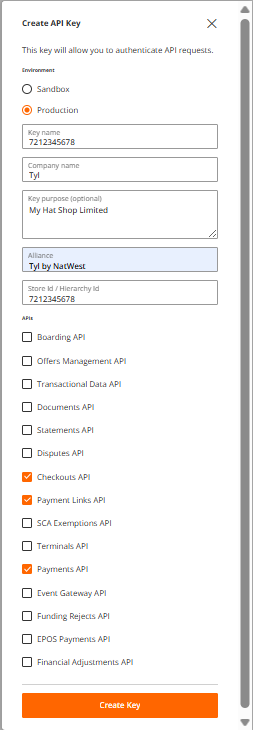
- The only API’s available for NatWest customers are:
- Payments API
- Checkouts API
- Payment Links API
- The only API’s available for NatWest customers are:
-
Click on “Create Key”.
-
Our team will review your API key request and send you an email as soon as your keys are ready to retrieve.
-
Success! You have completed your API access request.
Can my Developer request API access or credentials on my behalf?
Registration and API access requests must come from the main account holder or an existing authorised contact.
This keeps your business information secure and ensures sensitive credentials are only shared with the right people.
Once registered, you can use the Team Management menu to grant access to additional users.
For help and support on API access please use this Support Form
How do I use my API Key?
Our APIs use API keys to authenticate your requests and ensure your data stays protected and secure.
To use the API key on a request, you must include it in the API-Key request header.
curl -H "API-Key: <your key>" https://prod.emea.api.fiservapps.com/sandbox/exp/v1/authorisations
Updated 6 months ago